> ## Documentation Index
> Fetch the complete documentation index at: https://docs.inflection.io/llms.txt
> Use this file to discover all available pages before exploring further.
# Import from Data Warehouse
> Connect your data warehouse as a source of Inflection data. Send marketing activities from Inflection to DWH for analytics.
Connecting your data warehouse to Inflection enables you to centralize product usage, user, and organizational data for powerful marketing automation and personalization. Sync all your product users, organizations, and activity events to drive targeted campaigns based on real product behavior.
## Overview & Considerations
Each Inflection object has specific schema requirements for the source data warehouse table, so be sure to read these requirements carefully before connecting. The sources for these objects can be either views or tables in the data warehouse. For the purposes of this document we will refer to the source entities generally as “tables," although views are equally supported and have the same schema requirements as tables.
There is no limit to the number of data warehouse connections. With the exception of Product Activity, each Inflection object can only be connected to one data warehouse table, but each Inflection object can be connected to other sources like Salesforce and Segment, in addition to one data warehouse table. For example, the **Inflection Contact** can be connected to a Redshift table, Segment, and Salesforce, while the **Inflection Org** is connected to Snowflake or a second Redshift instance. **Product Activity** is synced from a single table or view. If your events live in one table per event, point Inflection at a view that unions them.
Fields mapped from a data warehouse to Inflection are connected in one direction only: Inflection will read the field from the data warehouse and write it to the mapped Inflection field, but any updates to this field in Inflection will not be written back to the data warehouse. For this reason, we advise treating these fields as data warehouse only fields in Inflection and not updating them from other sources (like Salesforce, forms, etc.).
Inflection supports both **1:many** and **many:many** relationships between Contacts and Organizations. Use **many:many** if a single email address can belong to many different organizations within your product. If an email address can only belong to one organization in your product, then use **1:many**.
Contact Inflection support ([support@inflection.io](mailto:support@inflection.io)) for help setting up this mapping.
## What Data to Send to Inflection
Unlike many other services, Inflection is built to handle massive scale when connecting data sources.
We recommend syncing **all** product users (people using your product) and org data to Inflection.
As for Product Activity, we recommend syncing all the product activity data that might someday be used by the marketing, growth, sales, and success teams. Some events, like debugging, logging, or internal engineering events need not be synced and will only clutter the Inflection instance for the GTM teams using Inflection.
When in doubt, we recommend syncing more data so the Inflection users can work autonomously and not have to request work from your data or engineering teams.
## Prerequisites
Before connecting your data warehouse, ensure you have:
* Admin access to your Inflection account
* Access credentials for your data warehouse
* Source tables that meet the schema requirements outlined below
Note that once your data warehouse connection is configured, you will contact Inflection support ([support@inflection.io](mailto:support@inflection.io)) for assistance with initializing the sync.
## Configure Your Data Warehouse Connection
Inflection currently supports importing data from the following data warehouses:
* [Snowflake Setup and Configuration (using storage integration)](/connections/warehouses/snowflake)
* [BigQuery Setup and Configuration](/connections/warehouses/bigquery)
* [Databricks Setup and Configuration](/connections/warehouses/databricks)
* [Redshift Setup and Configuration](/connections/warehouses/redshift)
Select your data warehouse from the list above and follow the warehouse-specific setup instructions.
Syncs run on a schedule you choose per connection: every 10 minutes, 30 minutes, hourly, every 4 hours, every 12 hours, or daily.
## Mapping Data Warehouse to Inflection Objects
The field requirements below follow the Inflection connection setup wizard, which checks each object's key fields before the connection can be activated. Every object needs a **last modified** timestamp; Inflection uses it to sync only rows that changed since the previous run. If that column has no time zone, the wizard asks you which zone it is in.
### Contacts
Contacts in Inflection represent a person and are **unique by email address**. Any data warehouse table mapped to Contacts needs to also be unique by email address (no duplicate email addresses in the email column of the data warehouse table). Inflection supports multiple product users to have the same email address across multiple orgs with the Product User object. In addition to uniqueness by email, any data warehouse table that is connected to the Inflection Contact object must have the following schema restrictions:
* `email_address` field is **unique & required. If the** `email_address `**is null or not a valid email address, Inflection will not sync that row.**
* must have a `unique id` (`primary key`), non-null and unique per contact
* must have a `last modified date` (`timestamp`)
* a `created date` is optional and can be mapped as a custom field
In addition to the required and recommended fields, any number of custom fields can be added to the Contact object in Inflection and synced from the data warehouse source table.
Below shows the Inflection table-import screen; the connection setup wizard shows these fields on its **Contacts** step.
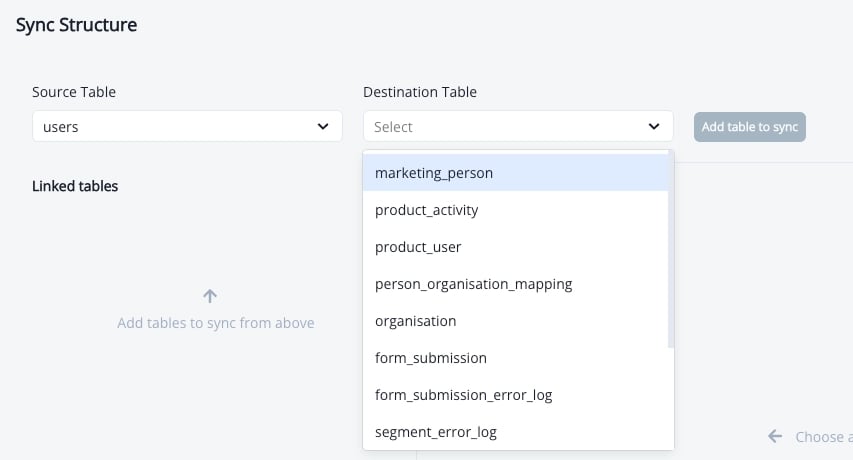
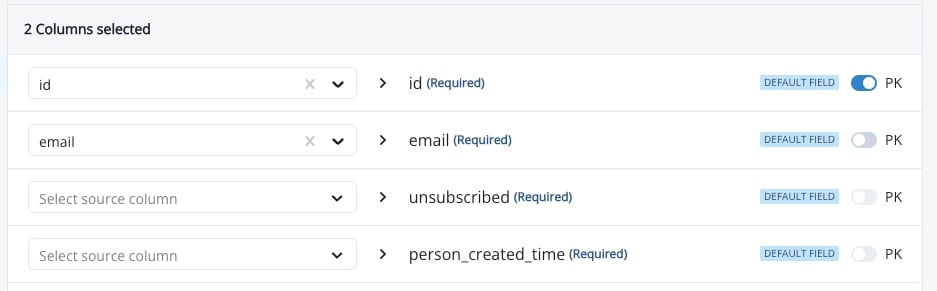 To connect a table, open the connection setup wizard, choose **Contacts**, pick the source table or view, confirm the ID, Email and Last modified columns the wizard detected, then map any additional columns.
 ### Product Activity
Product Activity in Inflection represents the stream of immutable events coming from your product. These Product Activity events are typically generated by a CDP like Segment or Rudderstack, or a product analytics platform like Amplitude, Pendo, or Heap. Inflection can consume this stream of events from the data warehouse using the Product Activity object.
Data warehouse tables synced to the Inflection Product Activity object must follow the following schema:
* must have a `primary key` (`id`) that is unique per event and up to 100 characters. If your table has no unique event ID, Inflection can generate a composite key.
* `event date` is a required non-nullable field (`timestamp`) representing when the event happened. It is also the incremental sync cursor.
* `event name` is a required non-nullable field (`string`, `char`, or `varchar`, up to 200 characters)
* `product user id` is a required non-nullable field. It must match the `id` of a row in the Product User table.
### Product Activity
Product Activity in Inflection represents the stream of immutable events coming from your product. These Product Activity events are typically generated by a CDP like Segment or Rudderstack, or a product analytics platform like Amplitude, Pendo, or Heap. Inflection can consume this stream of events from the data warehouse using the Product Activity object.
Data warehouse tables synced to the Inflection Product Activity object must follow the following schema:
* must have a `primary key` (`id`) that is unique per event and up to 100 characters. If your table has no unique event ID, Inflection can generate a composite key.
* `event date` is a required non-nullable field (`timestamp`) representing when the event happened. It is also the incremental sync cursor.
* `event name` is a required non-nullable field (`string`, `char`, or `varchar`, up to 200 characters)
* `product user id` is a required non-nullable field. It must match the `id` of a row in the Product User table.
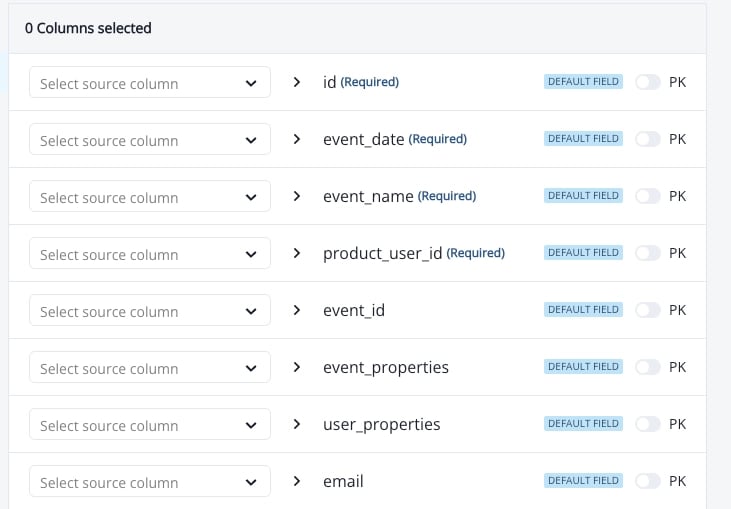 Optional columns: `email`, and `event properties` (JSON), for which you choose the source columns that are folded into it. Product Activity is read from one table or view as-is; joins and transforms are not available for this object, so do any reshaping in a view on your side.
### Product Users
The Product User object in Inflection represents the person using your product. Every Product User has an associated Contact and optionally can have an Org and Product Activity associated with it.
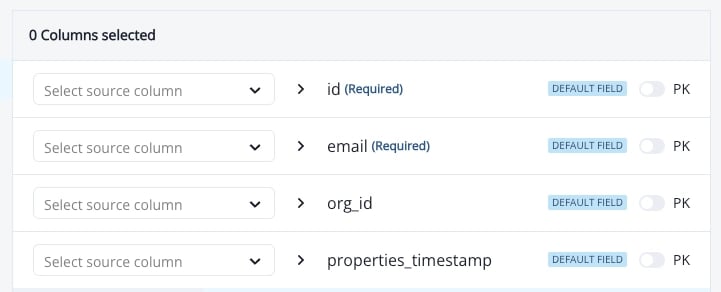
Any data warehouse table that is connected to the Inflection Product User object must have the following schema restrictions:
* `email_address` field is **required** & **non-nullable**
* rows with a null or invalid `email_address` are skipped
* must have a `unique id` (`primary key`), non-null and unique per product user
* must have an `org id`: the `id` of the Org the user belongs to. The Inflection product has specific capabilities around Orgs, and this relationship enables them.
* must have a `last modified date` (`timestamp`)
* a `created date` is optional and can be mapped as a custom field
Any custom columns on the Product User data warehouse source table can be mapped directly to the Product User object in Inflection and can also mapped directly to the Contact object in Inflection. For example, a Contact record in the CRM will have a `First Name` and `Last Name` field which will likely be mapped to the `First Name` and `Last Name` on the Inflection Contact object. Additionally, the product may collect a `First Name` and `Last Name` in product signup. There are a few options in this case:
1. Map the `First Name` and `Last Name` from the product sign up to the Product User as custom fields. Journeys, Tokens, personalization, etc. inside Inflection will have access to `First Name` and `Last Name` fields on both Contact and Product User (and these values can be different).
2. Map the `First Name` and `Last Name` from both the CRM and the product to the same fields on Contact. In this case, the most recent update will “win." Note that if there is also a bi-directional connection to the CRM setup for the `First Name` and `Last Name` fields, then `First Name` and `Last Name` updates from the product (through the DW source table) could cause an update in the CRM First Name field.
3. Map the `First Name` and `Last Name` fields to the Product User, and use operational campaigns to update the `First Name` and `Last Name` on the Contact based on custom business logic.
Below shows the Inflection table-import screen; the connection setup wizard shows these fields on its **Product users** step.
Optional columns: `email`, and `event properties` (JSON), for which you choose the source columns that are folded into it. Product Activity is read from one table or view as-is; joins and transforms are not available for this object, so do any reshaping in a view on your side.
### Product Users
The Product User object in Inflection represents the person using your product. Every Product User has an associated Contact and optionally can have an Org and Product Activity associated with it.
Any data warehouse table that is connected to the Inflection Product User object must have the following schema restrictions:
* `email_address` field is **required** & **non-nullable**
* rows with a null or invalid `email_address` are skipped
* must have a `unique id` (`primary key`), non-null and unique per product user
* must have an `org id`: the `id` of the Org the user belongs to. The Inflection product has specific capabilities around Orgs, and this relationship enables them.
* must have a `last modified date` (`timestamp`)
* a `created date` is optional and can be mapped as a custom field
Any custom columns on the Product User data warehouse source table can be mapped directly to the Product User object in Inflection and can also mapped directly to the Contact object in Inflection. For example, a Contact record in the CRM will have a `First Name` and `Last Name` field which will likely be mapped to the `First Name` and `Last Name` on the Inflection Contact object. Additionally, the product may collect a `First Name` and `Last Name` in product signup. There are a few options in this case:
1. Map the `First Name` and `Last Name` from the product sign up to the Product User as custom fields. Journeys, Tokens, personalization, etc. inside Inflection will have access to `First Name` and `Last Name` fields on both Contact and Product User (and these values can be different).
2. Map the `First Name` and `Last Name` from both the CRM and the product to the same fields on Contact. In this case, the most recent update will “win." Note that if there is also a bi-directional connection to the CRM setup for the `First Name` and `Last Name` fields, then `First Name` and `Last Name` updates from the product (through the DW source table) could cause an update in the CRM First Name field.
3. Map the `First Name` and `Last Name` fields to the Product User, and use operational campaigns to update the `First Name` and `Last Name` on the Contact based on custom business logic.
Below shows the Inflection table-import screen; the connection setup wizard shows these fields on its **Product users** step.
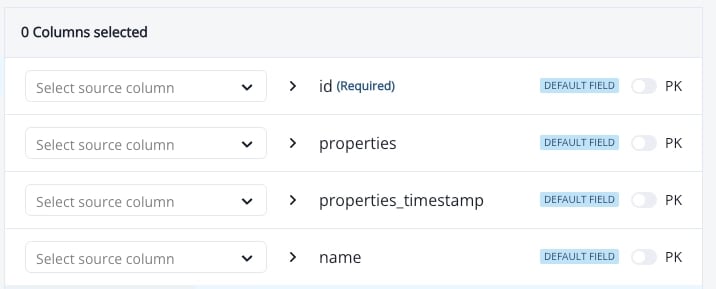
 ### Organizations
Organizations (or “Orgs") represent the group of people in your product. Sometimes also referred to as “workspaces” and are distinctly different than Accounts.
Data warehouse tables synced to the Inflection Org object must follow the following schema:
* must have a `unique id` (`primary key`), non-null and unique per organization
* must have a `last modified date` (`timestamp`)
* a `created date` is optional and can be mapped as a custom field
* strongly recommended to have a `name` (`string`, `char`, or `varchar`) for display in the Inflection UI. Without a name, the Inflection app will show the `id`
In addition to the required and recommended fields, any number of custom fields can be added to the Organization object in Inflection and synced from the data warehouse source table.
### Organizations
Organizations (or “Orgs") represent the group of people in your product. Sometimes also referred to as “workspaces” and are distinctly different than Accounts.
Data warehouse tables synced to the Inflection Org object must follow the following schema:
* must have a `unique id` (`primary key`), non-null and unique per organization
* must have a `last modified date` (`timestamp`)
* a `created date` is optional and can be mapped as a custom field
* strongly recommended to have a `name` (`string`, `char`, or `varchar`) for display in the Inflection UI. Without a name, the Inflection app will show the `id`
In addition to the required and recommended fields, any number of custom fields can be added to the Organization object in Inflection and synced from the data warehouse source table.
 ### Person Organization Mappings
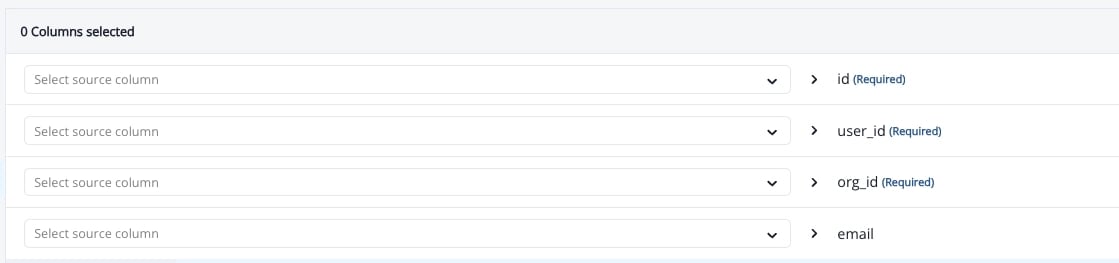
This mapping represents that a user belongs into an organization or workspace in your product. Mapping is used to represent a **many to many** relationship in your schema.
Data warehouse tables synced to the Inflection Mapping object must follow the following schema:
* must have a `unique id` (`primary key`), non-null and unique per membership row
* must have a `user id` which matches a Product User `id`
* must have an `org id` which matches an Organization `id`
* must have a `last modified date` (`timestamp`)
* `email` is optional
In addition to the required fields, any number of custom fields can be added to the Mapping object in Inflection and synced from the data warehouse source table to represent properties of that User in relation to the Org (example: is\_admin, role, etc.).
### Person Organization Mappings
This mapping represents that a user belongs into an organization or workspace in your product. Mapping is used to represent a **many to many** relationship in your schema.
Data warehouse tables synced to the Inflection Mapping object must follow the following schema:
* must have a `unique id` (`primary key`), non-null and unique per membership row
* must have a `user id` which matches a Product User `id`
* must have an `org id` which matches an Organization `id`
* must have a `last modified date` (`timestamp`)
* `email` is optional
In addition to the required fields, any number of custom fields can be added to the Mapping object in Inflection and synced from the data warehouse source table to represent properties of that User in relation to the Org (example: is\_admin, role, etc.).
 ### Accounts
Accounts represent the Account object in the CRM and are distinct from Orgs which represent the Org (or workspace) in the product. For example, your sales or sales ops teams likely decide what Contacts are connected to what Account in the CRM, but your customers can add whoever they want to the org in your product. So these objects are distinct in Inflection.
Most Inflection customers sync Account data from the CRM and not from the data warehouse. Syncing Account data exclusively from data warehouse, or from both data warehouse and CRM is supported. The most common case for syncing Accounts from data warehouse is if you are using a CRM that Inflection does not have a direct API integration with.
Contacts are linked to Accounts by matching one Contact field to one Account field (for example, email domain to account website). Inflection support configures this pairing for your instance.
Data warehouse tables synced to the Inflection Account object must follow the following schema:
* must have a `unique id` (`primary key`), non-null and unique per account. **If Salesforce is also connected, this must be the Salesforce Account Id.** Inflection merges account records by ID, so a different ID creates a duplicate account.
* must have a `last modified date` (`timestamp`)
* a `created date` is optional and can be mapped as a custom field
* strongly recommended to have a `website (or domain)` (`string`, `char`, or `varchar`) for Contact to Account mapping
* strongly recommended to have a `name` (`string`, `char`, or `varchar`) for display in the Inflection UI. Without a name, the Inflection app will show the `id`
In addition to the required and recommended fields, any number of custom fields can be added to the Account object in Inflection and sync’d from the DW source table.
This documentation is built and hosted on [Mintlify](https://mintlify.com), a developer documentation platform.
### Accounts
Accounts represent the Account object in the CRM and are distinct from Orgs which represent the Org (or workspace) in the product. For example, your sales or sales ops teams likely decide what Contacts are connected to what Account in the CRM, but your customers can add whoever they want to the org in your product. So these objects are distinct in Inflection.
Most Inflection customers sync Account data from the CRM and not from the data warehouse. Syncing Account data exclusively from data warehouse, or from both data warehouse and CRM is supported. The most common case for syncing Accounts from data warehouse is if you are using a CRM that Inflection does not have a direct API integration with.
Contacts are linked to Accounts by matching one Contact field to one Account field (for example, email domain to account website). Inflection support configures this pairing for your instance.
Data warehouse tables synced to the Inflection Account object must follow the following schema:
* must have a `unique id` (`primary key`), non-null and unique per account. **If Salesforce is also connected, this must be the Salesforce Account Id.** Inflection merges account records by ID, so a different ID creates a duplicate account.
* must have a `last modified date` (`timestamp`)
* a `created date` is optional and can be mapped as a custom field
* strongly recommended to have a `website (or domain)` (`string`, `char`, or `varchar`) for Contact to Account mapping
* strongly recommended to have a `name` (`string`, `char`, or `varchar`) for display in the Inflection UI. Without a name, the Inflection app will show the `id`
In addition to the required and recommended fields, any number of custom fields can be added to the Account object in Inflection and sync’d from the DW source table.
This documentation is built and hosted on [Mintlify](https://mintlify.com), a developer documentation platform.